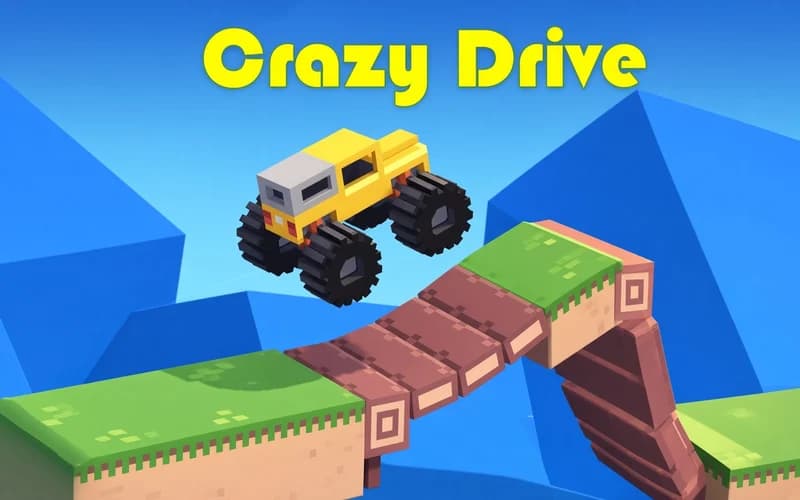
Crazy Drive
📖 Crazy Drive About
Crazy Drive throws out the usual driving setup. There is no steering wheel at all; you only get throttle, reverse and the ability to tilt the vehicle forward or back in the air. It opens safely in your browser with nothing to install.
What kind of game is Crazy Drive?
No laps, no rivals, no clock. Each level is its own obstacle course: ramps, bottomless gaps, collapsing platforms, thin beams and swinging hammers. Winning comes down to reading momentum. Some gaps only clear at full speed, while others punish anything harder than a light tap.
There are over 125 levels, including a separate set built around monster-truck">monster truck courses. The real twist is that your vehicle changes every level. One stage puts you in a huge monster truck, the next in a tiny buggy, then something towing a trailer or an excavator. Each carries its weight differently, so the reflex you learned last level may not transfer.
No cost to retry
Flip over or get wedged and the R key restarts the level instantly. With no lives, fuel or waiting timer, trying one obstacle ten different ways is completely free.
Why kids like it
With controls down to two keys, the first level clicks in seconds. Difficulty climbs slowly so progress never stalls, and a tumbling vehicle usually looks funny rather than harsh.
Is it safe?
A physics game with plain, clean artwork. Crashes play out in slow motion and stay playful, with nothing frightening on screen. Suitable for ages 7 and up.
More Skill Games
These two courses run on the same mix of physics and timing.
- Moto X3M Pool Party — A level-based game about flipping your bike through pool-themed obstacle runs to the finish.
- Extreme Mega Ramp Car Stunts — A 3D stunt drive about launching off giant ramps and nailing the landing angle.
🎯 How to Play
- Accelerate: Drive forward with W or ↑.
- Reverse: Back up with S or ↓, since a step backwards is sometimes the answer.
- Tilt the vehicle: Use A D or ← → to pitch the nose while airborne.
- Set up the landing: Level the vehicle mid-jump so the wheels touch down first.
- Start over: Press R the moment you get stuck to reset the level.
- Learn the vehicle: Drive a few test seconds on a new level to feel its weight.
- Reach the finish: Touching the marker at the end of the course completes the level.
⌨️ Controls
💻 PC
📱 Mobile
💡 Tips & Tricks
- Full throttle is not always right: On thin beams and narrow platforms, light taps keep the vehicle balanced.
- Build speed before a gap: For long jumps, gather momentum well before the ramp rather than on it.
- Level the nose in the air: Use the tilt keys in small nudges instead of one big rotation.
- Read collapsing ground: Roll smoothly across breakable platforms rather than stopping on them.
- Brake early in heavy rigs: Trucks and excavators stop late, so judge the landing spot from further out.
- Do not fear the reset: R costs nothing and beats dragging out a bad start.
⚡ Features
- Steering-free control: Only throttle, reverse and tilt, with no other keys to learn.
- Over 125 levels: Each one a standalone obstacle course solved on its own terms.
- A new vehicle each level: Monster trucks, buggies, trailer rigs and excavators rotate through.
- truck">Monster truck set: An extra group of levels built for the heavy machines.
- Instant retry: One-key reset with no penalty and no waiting.
- Clean visuals: Uncluttered artwork that keeps every obstacle easy to read.