📖 Space Plan About
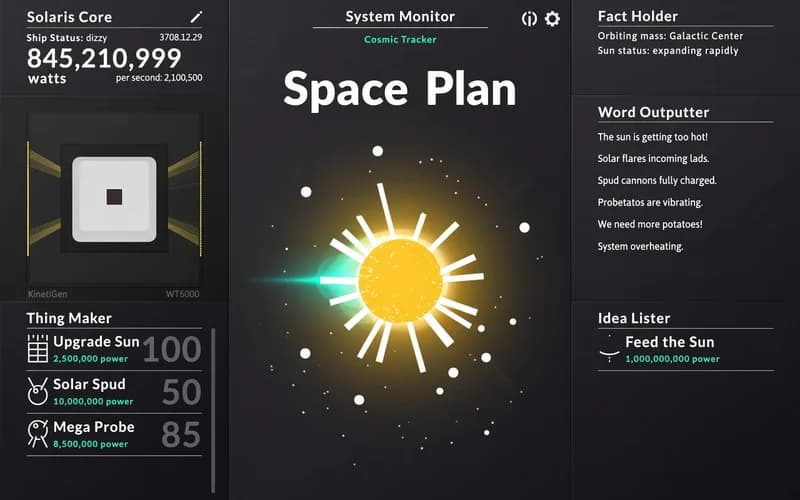
Space Plan opens on a plain screen: one console, one planet and a trickle of power. Every click produces energy, and that energy goes straight back into new systems. It runs safely in your browser with nothing to install.
How is Space Plan played?
At the start each click gives a small amount of power. Save enough and you buy the first generator, after which production begins to flow on its own. From there the game is about building a production chain, since which upgrade you take and when directly sets your pace.
As output grows, new instruments unlock. Scanners study the surface, probes descend and the console log fills in one entry at a time. Some experiments are proper science and others are surprisingly silly.
Why is it not an endless game?
Space Plan was not built to grow numbers forever. It has a definite ending, and the story carries you toward it. That makes playing without rushing, and actually reading the text, the better approach.
Why kids like it
The rules land in one sentence and progress stays visible the whole time. Watching the figures climb is motivation enough for a few minutes during a break.
Is it safe?
A completely calm game. There is no violence, no frightening imagery and no section demanding fast reflexes. The text is in English, so ages 10 and up follow it more comfortably.
More Strategy Games
If managing resources and investing in the right order appeals to you, take a look at these two.
- Army Fight 3D — A brisk three-dimensional strategy game about raising a small army and defending your base.
- Redcoats.io — A multiplayer arena on wide historical maps where positioning as a team matters.
🎯 How to Play
- Generate power: Click or tap the button on screen; each press adds a small amount.
- Buy the first generator: The purchase button activates once you have saved enough.
- Check the costs: Hover over an item to see its price and the effect on production.
- Unlock new systems: Scanners, probes and satellites come into play one after another.
- Scroll the panel: As the list grows, scroll down to reach the newer upgrades.
- Read the log: Console text explains where the story is heading and counts as progress.
⌨️ Controls
💻 PC
📱 Mobile
💡 Tips & Tricks
- Grow output first: Prefer items that keep producing over one-off boosts.
- Do not sit on the button: Once generators are running, manual clicking quickly stops mattering.
- Watch the price jumps: Every purchase makes the next one dearer, so split across two branches.
- Leave the tab open: Production keeps ticking in the background, and short breaks add up.
- Do not skip the text: Console notes hint at which upgrade is worth taking next.
⚡ Features
- Story-led progress: Console entries reveal new information throughout the game.
- Automatic production: Once generators are placed, power accumulates on its own.
- Plain interface: One screen, a handful of buttons and readable numbers.
- A definite finale: The game moves toward a real ending rather than an endless loop.
- Automatic saving: Progress is stored, so closing the page does not cost you anything.